UP TO THE MINUTE







Creating Smart Estimates in Under 10 Steps
By JobNimbus.
The Smart Estimate feature makes creating estimates quick, easy and accurate, every time.
The stakes are high when a contractor is creating an estimate, one mistake can cost you up to thousands of dollars. Add in the time it takes to accurately create an estimate that could be spent completing more jobs and the pressure to efficiently create an estimate becomes even more intense. There has got to be a better way. Luckily, there is, introducing Smart Estimates, the JobNimbus feature that is making it simple to create a fast and accurate estimate—just add in your measurements and go.
Based on the Smart Estimate Template configuration, those measurements are then used to calculate how much of each product is needed for that job. To create a Smart Estimate, you will first need to set up a Smart Estimate Template in your settings, to do that follow these steps:
1 - Navigate to your Contact or Job.
2 - Select the Financials tab.
3 - Click on "+ Create smart estimate.”
4 - Choose your Smart Estimate Template from the available options.
5 - Fill out your measurements.
6 - Update the products as needed. You can choose from drop-down menus if you set that up when creating the template.
7 - Finish your Smart Estimate and let JobNimbus do the calculations for you.
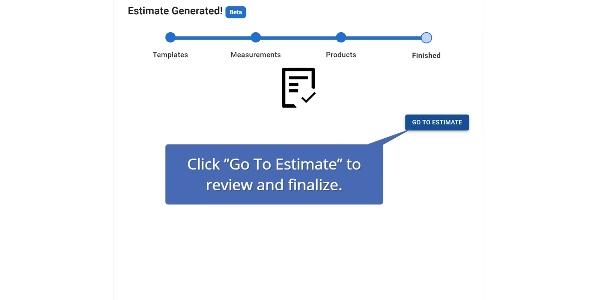
8 - Once you click the Go To Estimate button, you will be directed to an edit view of the Estimate's details. Make any additional changes as needed.
9 - Save your estimate.
Learn More About JobNimbus Roofing Software
Read, Listen or Watch on demand to learn more about starting to use software automation and how you can leverage technology to improve your business.
Original article source: JobNimbus
Recommended For You

Tips to help you sell a siding job
Read More ...
4 steps to assembling the estimating puzzle
Read More ...
Your Crash Course to Installing Metal Roofing on Existing Metal Roofs
Read More ...
UP TO THE MINUTE


Comments
Leave a Reply
Have an account? Login to leave a comment!
Sign In